Testimonials

What our customers are saying

"You're the best I have."


- D. Barton, Global Oracle Consulting Firm

about us

Service Delivery

Multiple ways to access M&S

M&S offers technology and process solutions through multiple offerings and vehicles. End-to-end solutions, training and mentoring, staffing, ongoing support.

read more

Effective and Efficient

Exceptional Results

M&S today reflects a rare combination of out-of-the-box thinkers, deep business acumen, enterprise architectural design/engineering, and software prowess.

contact us

From the M&S Blog...

ADF Table Row Selection Event Update Form

One of the UI requirements in a recent ADF project was to use an ADF Read-Only Table and its built-in functionality (row selection, filtering and sorting) to allow a user to find a row, select it, then automatically have a form on the same page be updated with the data from the row selected for updating and saving. Let’s run though how to implement this…

1. Build the ADF Read-Only table by dragging the appropriate data control onto the view. Ensure you enable the appropriate ADF behaviors on the Edit Table Columns screen. Row Selection is required, but Filtering & Sorting is optional depending on your needs.

2. Build your ADF Form using the same data control. Ensure your using the same Iterator as the table.

a. Bind your button to the appropriate ADF control to update the DB. For example if you’re using EJB 3.0/JPA then you should have a mergeObject data control that will save updates to object to the DB. In the Edit Action Binding screen make sure to use the same Iterator in your EL expression for the value of the action binding as your Table and form components.

b. Select the ADF container that contains your form components (for example af:panelFormLayout), and change its Behavior -> PartialTrigger property to the id of your table. This causes your form container to listen for any events that get fired from your table, and thus will refresh the form with the iterator’s currentRow (when the selection event get fired from the table).

3. Run the applicaiton and test, without any additonal work, it should look something like……

Custom-Built Java vs. Open-Source Portal (like Liferay) – What Should I Do?

You are not alone. Many organizations are going through the same analysis and process. There are many possible options/variables to consider, but “should I roll-my-own custom site vs. leverage [open-source] products?” is one of the most common questions to answer today when considering a new web project. Following is a quick list of reasons you might want to consider choosing one over the other.

Custom-Built Solution

  • Complete Flexibility: Build a relevant solution without any, or many, compromises — whatever compromises you do make will likely be based on time and money as opposed to wrestling the wisdom of someone else’s architectural choices
  • Smaller Footprint: Along the same lines, only write code and maintain what is vital to your specific needs

Liferay

  • Why build that?: Liferay handles aspects of the implementation that you simply do not want to have to build and maintain on your own unless you have a compelling reason to do so
    • authentication options – pre-built integration with LDAP and other technologies like CAS
    • security – roles-based permissions model
    • technology architecture (db abstraction, UI design, templating, page structure, etc.) – Liferay has already thought through flexible approach
  • Learning curve: though there is a learning curve to Liferay (or any other product), it you can actually find external resources who understand Liferay, but anyone outside the organization will need time to pick up on all the nuances of your custom code/architecture
  • Still Custom: We have built enterprise web applications in portal environment where one would have to dig a bit to determine a portal framework was used. You can still build custom features and drop in standards-based portlets where you need in a solution like Liferay’s. Also, remember, you have access to the source code, unlike other products on the market.

Click here to learn more

There are certain use cases where I generally lean to one side more than the other. In cases where Liferay’s features related to page structure, templating, collaboration, and security are useful, I tend to go in that direction. For scenarios where I know my user community and stakeholders have very specific workflow and UI needs for a web-based application where requirements are clear, I consider custom code more carefully.

Oracle ADF vs. Other Java Web Frameworks

To extend on an earlier blog posts by a colleague here at M&S, I’m a firm believer in using different technologies in different situations. Trying to make a technology ‘work’ when another is clearly a better choice is very often a critical mistake. Reasons why these decisions get made are numerous (familiarity with a technology, existing infrastructure, etc). With that said, my own take on ADF vs. other Java web frameworks (such as Grails) is actual a lot more black & white than I thought it would be.

While ADF enables typical CRUD functionality quickly and efficiently, it’s abstraction from the actual underpinnings and code make the overall learning curve higher. Personally, I’d rather be forced to generate my own view code and Javascript, as this has become the most important part to any rich web application and understanding it’s technology at a granular level is critical. On the flip side, ADF is extremely flexible allowing you to mix and match model technologies that fit just about any business infrastructure, whereas most other frameworks typically limit your choices here. Additionally, ADF Faces provides about 100 rich, AJAX enabled UI components out of the box that have functionality such as sorting, filtering, and row selection, that you’d need to use jQuery or Prototype to handle elsewhere.

At this point, I asked myself, when would I use ADF vs. another conventional Java web framework? Here are the characteristics that I’ve come up with that best suit ADF or another Java web framework. What are your thoughts?

ADF Typical Project Characteristics

  • Enterprise
  • Internal / Intranet
  • Proprietary components ok (ADF Faces, ADF BC)
  • Style unimportant
  • Large datasets
  • Rapid development critical
  • Abstraction from underpinnings ok

Other Conventional Web Framework Project Characteristics

  • Startups / Consumer Web Apps
  • Internet
  • Style Important / particular UI requirements
  • Bulk UI changes probable
  • Open Source required
  • Dev team familiar with technology at a low level

Four Middleware 11g Servers — Here we go!

We just started into installs for four middleware servers for a customer. These will each run DB, WebLogic, IdM, SOA/BPM, UCM, and WebCenter — all 11g.

There’s nothing like getting fresh, fast, functionally-useless hardware and turning it into a powerful piece of problem-solving equipment. – Historic M&S Dogma

Gmail (or Google Apps Email) Undo Send

If you use Gmail for personal or business, I recommend enabling the “Undo Send” feature in your labs settings. It flashes a bar where you can cancel sending your message for a few seconds which really helps, since apparently, it is normal brain function to only remember that one little thing after you have clicked send.

I have a theory on it, though. We likely have a small rush of adrenaline each time an email is sent that triggers a moment clarity in thought the moment we “pull the [send] trigger”. I haven’t had a crazed moment like Bridgestone’s new commercial (yet), but it has saved me some minor heartache.

YouTube Preview Image

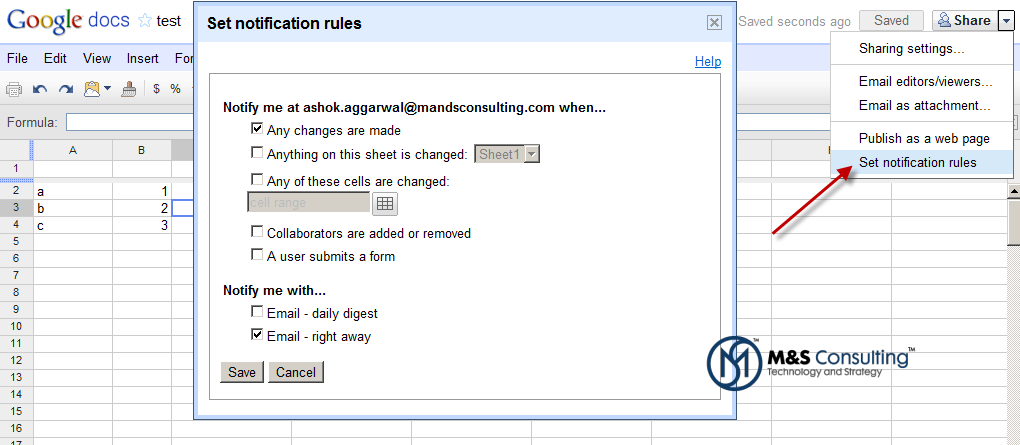
Google Docs Notification Rules – Docs vs Spreadsheets

I initially thought this was an issue with my share settings or something I was not configuring correctly, but as it turns out, this really is just a feature available in Spreadsheets at the moment. I expect Google will deliver this feature to other document types soon.
read more

Installing JDeveloper 11g on Windows with SOA, BPM, and WebCenter Extensions – Video Walkthrough

This video walks through the JDeveloper 11g PS3 (11.1.1.4) — with integrated WebLogic Server — installation on Windows 2008 R2 64-bit. All in 3 minutes.

YouTube Preview Image

High Level Steps

  1. Download JDeveloper
  2. Run .exe
  3. Configure Installation Options
  4. Install Extension

Oracle WebCenter 11g Patch Set 3 (PS3) 11.1.1.4 Download for Windows, Linux, etc.

Oracle has now officially released WebCenter 11g PS3 (11.1.1.4). You can download it online as of today (Jan 25, 2011). This marks a major leap in WebCenter’s capabilities and maturity as an Enterprise 2.0 Collaboration Portal. Look for more information on the M&S blog to come.